Core Gameplay Loop
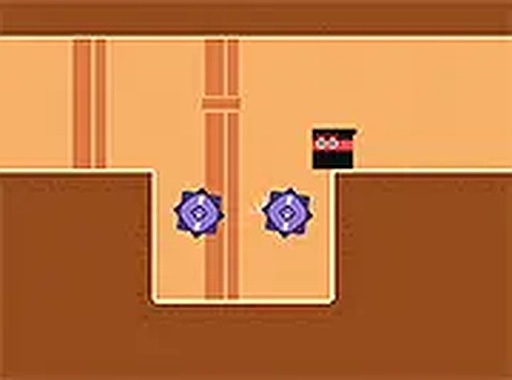
Phantom Path Explorer Adventure presents a straightforward objective: guide your character from the start of each stage to the exit. The challenge lies in the environment itself. Each area is filled with moving barriers, rotating platforms, and patrolling creatures that react to your presence. Success depends on learning the rhythm of these hazards and choosing the right moment to advance. The game does not rely on speed alone; careful observation and patience are equally important. Players who rush often find themselves restarting, while those who study the patterns make steady progress.
Stage Design Philosophy
The developers have arranged the stages to introduce new concepts gradually. Early areas focus on single obstacles, allowing players to understand basic movement and timing. Later stages combine multiple hazards in layered arrangements, requiring split-second decisions and precise control. Each stage feels distinct because the placement of traps and enemies changes significantly. Some stages require quick dashes between safe zones, while others demand waiting for a clear path. This variety keeps the experience fresh and encourages players to approach each new area with a fresh perspective.
Controls and Accessibility
Phantom Path Explorer Adventure is designed to be played on both desktop computers and mobile devices. Keyboard controls on a computer allow for precise directional input, while touch controls on a phone or tablet respond to taps and swipes. The interface remains clean and uncluttered, with no unnecessary buttons or menus. A full-screen mode is available for desktop users who want to eliminate distractions. The game loads instantly in any modern web browser, with no downloads or installations required. This makes it easy to play a quick session during a break or a longer session at home.
Progression and Difficulty Curve
As players advance through the stages, the difficulty increases in a measured way. New hazards appear, and the timing windows for safe passage become tighter. The game does not punish failure harshly; restarting a stage is quick and encourages experimentation. Each attempt provides valuable information about the stage layout and hazard patterns. This trial-and-error approach helps players build skill naturally. The later stages demand a high level of concentration and adaptability, rewarding those who have mastered the fundamentals. The sense of accomplishment after completing a particularly tricky stage is a key part of the game's appeal.
Visual and Audio Atmosphere
The visual style is clean and functional, with each stage featuring a distinct color palette that helps players distinguish different elements. Hazards are clearly marked, and the character's movements are smooth and responsive. The audio design complements the gameplay with subtle sound effects that indicate when a hazard is about to move or when the player has successfully cleared a section. There is no distracting background music, allowing players to focus entirely on the task at hand. The overall presentation is minimal but effective, prioritizing clarity and gameplay over flashy graphics.
✅ Compatibility & Testing
• Desktop (Windows 11, macOS Ventura)
• Mobile (iPhone 14, Samsung Galaxy S23)
• Tablet (iPad Pro, Android tablet)
✅Supported browsers: Chrome, Safari, Edge, Firefox (latest versions)
❌ Not supported: Internet Explorer, older browser versions










Comments
0 comments